Most useful boards do not begin as presentations.
They begin as working surfaces: a note that explains a constraint, a diagram that points at a dependency, an evidence card someone should revisit, an image that gives a discussion its reference point, a decision with two imperfect options. The board gets more useful as it accumulates material. It also gets harder to read.
That is not a failure of the board. It is what working thinking looks like before it has an audience.
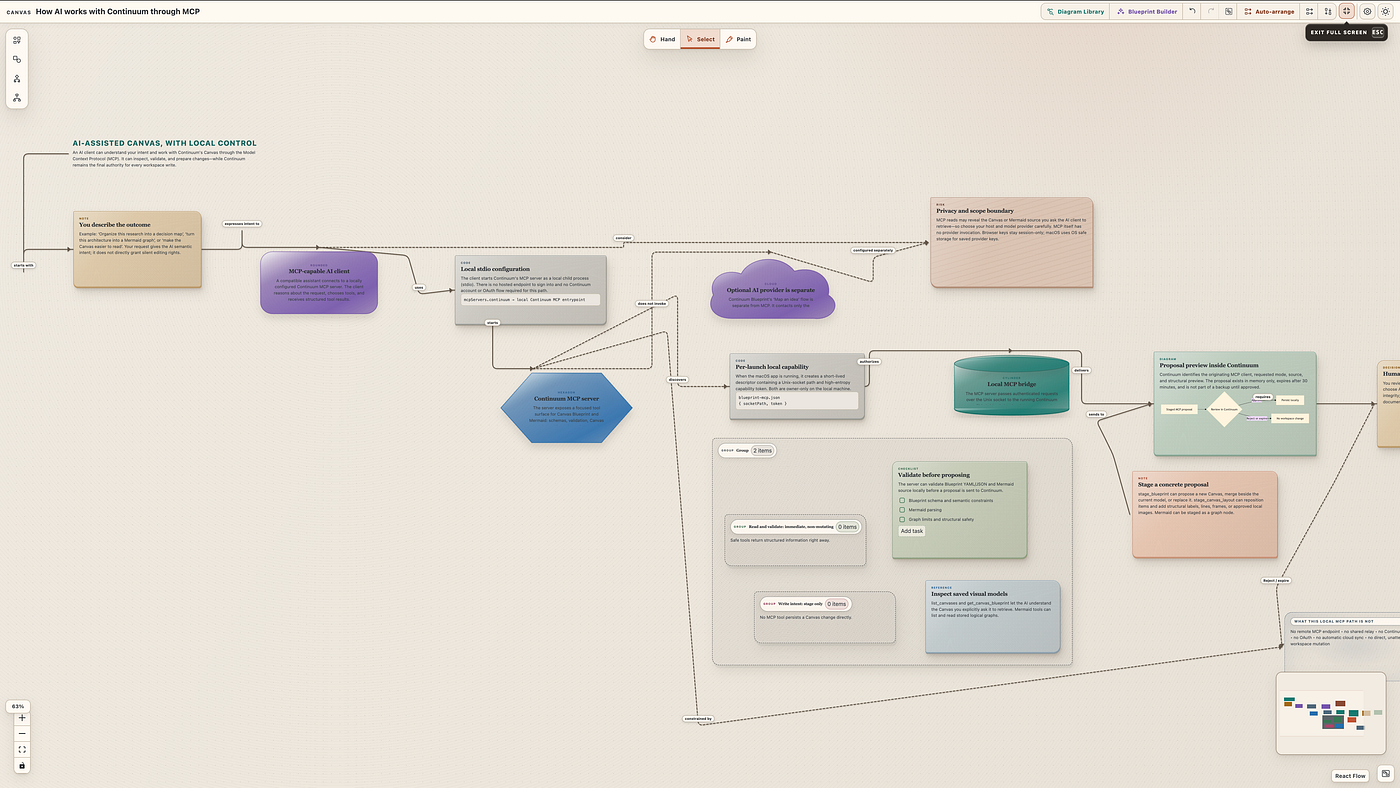
A real full-board workflow capture. The point is not that every board should look like this; it is that the relationship between intent, a local MCP bridge, a visible proposal, and an approved local change can remain inspectable.
The question is what should happen when that audience appears. A new engineer needs the system path. A client needs the decision and its consequences. A teammate returning in three months needs enough hierarchy to find the supporting evidence without reconstructing the whole conversation.
Continuum’s Canvas now gives an MCP-connected AI client a narrow job in that moment: prepare a better reading order, then wait.
The board stays the source of truth
Canvas is not a screenshot surface. It is a native workspace where notes, checklists, code, references, local images, Mermaid diagrams, decisions, evidence, relationships, lines, labels, and frames can live together.
That matters because the value is not only in the items. It is in their arrangement. A technical diagram beside a decision tells a different story than the same diagram at the edge of a board. A frame can make a research cluster feel like context instead of an afterthought. A label can tell a new reader where to begin.
Until now, changing that hierarchy was a manual editorial task. It still can be. But it is also a task an assistant can prepare well when it is given both the board and a clear audience.
For example:
“Organize this Canvas for a new engineer. Keep the decision path left to right, group supporting evidence, and label each section.”
The prompt does not ask the assistant to replace the reasoning. It asks it to make the existing reasoning easier to perceive.
That distinction is the product idea.
MCP becomes a seam between intent and structure
The local MCP server in the running macOS app can inspect a Canvas and its relationships. An MCP-connected client can then stage a layout proposal containing the existing item IDs it would move, their proposed positions, and any new labels, frames, lines, or local images it recommends.
The tool does not get to silently rearrange the board.
Instead, Continuum receives a memory-only proposal and opens a review surface inside the app. It identifies the client that staged it, shows the proposed arrangement, counts what will move and what will be added, and presents the rationale. The board does not change merely because an AI client produced a plausible answer.
That is a small implementation detail with a large effect on how the feature feels. The proposal is not a hidden intermediate state somewhere in a chat transcript. It is part of the workspace, where the person who understands the consequences can see it.
The review is where the two tools meet
Canvas and MCP are often described as separate capabilities: one is a visual surface; the other is an interface for tools. In this workflow, they meet at the review.
Canvas gives the proposal something concrete to preserve: the actual notes, decisions, evidence, and relationships already on the board. MCP gives an assistant a structured way to respond to that material. The review gives the person a final, visible decision.
The sequence is deliberately simple:
- Read the board. The assistant inspects the Canvas and understands the request.
- Stage a proposal. It returns a reading order and optional lightweight structure, rather than changing the workspace.
- Review in Continuum. The proposed moves and additions become visible in the app.
- Approve or reject. Only an explicit approval persists the layout and any local asset.
An untouched proposal expires after 30 minutes. Rejecting it or closing the app leaves the workspace unchanged.
This is not a claim that approval authenticates anyone. It is a workflow boundary: a useful pause between a tool’s suggestion and a durable edit.

Images belong in the same boundary
Images are often where a board stops being abstract. A screenshot of an interface, a reference composition, or a system diagram can help a reader orient immediately. They also create a tempting shortcut for integrations: fetch whatever URL a model mentions and put it on the board.
Continuum takes a more deliberate route.
The MCP can stage a PNG, JPEG, WebP, or GIF as a local data URL, up to 10 MiB. It does not fetch remote image URLs. When the proposal is approved, Continuum saves the image in the same local asset store used by Canvas image nodes. If the proposal is rejected or expires, no image asset is written.
That keeps image placement in the same story as layout: it is proposed, visible, and chosen — not quietly imported because an assistant had access to a URL.
A useful kind of assistance
There are many jobs an AI client could be asked to do around a board. Some are too broad to be trustworthy: decide what matters, rewrite the whole record, or “make it better” with no audience in mind.
Reading order is a better job.
It is specific enough to evaluate. A person can look at the proposed left-to-right path and tell whether it supports the intended reader. They can keep the content while declining the hierarchy. They can accept the labels but move one decision back where it belongs.
The assistant contributes speed and pattern recognition. The person keeps judgment, context, and authority.
Continuum is not trying to turn a Canvas into an autonomous workspace. It is trying to make the moment between a useful suggestion and a real change visible enough to trust.
That is why the workflow ends inside the board, not inside the tool call.