products, collaborations, utilities, games, and experiments
A small studio journal / issue no. 01
Fifteen projects.
Three years.
Still curious.
A field journal of products, utilities, games, collaborations, and small experiments—what shipped, what paused, what changed, and what each one taught me.
01 / Portfolio snapshot
A place for every kind of build.
A live product and a two-week experiment have different stories to tell. The ledger keeps room for both and makes each stage easy to understand.
available products or public collaborations
public builds, private foundations, playable betas, and working systems
completed and paused experiments worth keeping
Support systems—release repositories, entitlement services, and read-only dashboards—are folded into the product they support. Backups are not counted as products.
02 / Shipped stories
The products that
made it into the world.
Across browser, desktop, mobile, and games, the same loop applies: find the real constraint, build the critical path, and make the public story match the shipped product.
 01
Continuum
A local-first calculation workspace that turns readable notes into live results, with focused macOS, Windows, and Linux companions for quick calculations.
Published desktop version 1.3.1 adds named calculation groups, controls to collapse or expand them, and a manager to rename, reorder, or ungroup regions. Pin and copy actions now use icons in the result rail. Quick Calculation, the full editor, and Canvas still share documents with conflict recovery and live variable cards. The signed and notarized macOS build passed desktop and MCP smoke tests. Windows and Linux packages passed structure checks, with installation and runtime tests outstanding. The free local file reviewer remains available, and hosted API access stays closed.
Current progressShipped, learning, refining
- Started
- Feb 2026 as of Aug 2026
- Available on
- Web + 3 desktop platforms as of Aug 2026
What it taught me
A product becomes easier to trust when its calculations, feature catalogue, documentation, and public claims all draw from the same product record.
Next on the workbench
Learn how connected documents and Canvas calculators hold up in everyday work, complete Windows and Linux runtime acceptance, and keep hosted API access closed until its release gates pass.
 02
SubKeep
A Chrome extension that gives Google Keep stronger folder organization, focused note workflows, and local-first preferences.
The extension is being refined through the 0.0.8 release line, with label picking, sidebar groups, guided setup, move previews with Undo, and localized navigation fixes. Merged 0.0.8.2 work clarifies Free and Pro plans and opens trial signup on a dedicated extension page. Starting a trial requires an explicit choice and successful verification; ordinary sign-in does not start one. A follow-up fixes hidden account controls and centers the trial page. Store publication of the candidate and any retention or conversion improvement remain unconfirmed. The captioned product film demonstrates organization and Zen Mode; usage sharing remains optional.
Current progressShipped, listening, improving
- Started
- Aug 2025 as of Aug 2026
- Release state
- Published extension as of Aug 2026
What it taught me
Browser-extension quality depends as much on defensive DOM behavior and clear permission boundaries as it does on the visible feature.
Next on the workbench
Validate the exact 0.0.8.2 package and confirm Store publication, then evaluate the trial journey and returning use from opted-in observations.

Contribution rhythm
Local repositoryPatterns, not scores
GitGlow
A local-first desktop application for exploring contribution patterns, repository activity, and the rhythm behind a body of Git work.
GitGlow runs on macOS, Windows, and Linux. Published version 2.0.8 adds approximate active minutes based on foreground interaction, feature navigation, and selected completed workflows to product analytics. Analytics is on by default, existing opt-outs are preserved, and anyone can turn it off in Settings for free. It excludes repository contents, paths, prompts, account identity, and arbitrary text. Session recording and automatic interaction capture are disabled. The macOS build is signed and notarized, and the Windows installer is unsigned. The release verification covered packages for Windows and Linux.
Current progressReleased, operating, learning
- Started
- 2025 as of Sept 2026
- Desktop platforms
- macOS + Windows + Linux as of Sept 2026
What it taught me
Analytics become more useful when they help someone understand a working rhythm instead of simply producing a larger score.
Next on the workbench
Observe how readers move from the learning guides, comparison, and product film into real repository review, while keeping the local workbench fast and legible.
 04
Green Compass
A mobile-first climate-action product that turns broad sustainability goals into approachable guidance and concrete next steps.
My contribution spans a cohesive mobile and web product surface, including an editorial marketing system, responsive presentation, and product roadmap storytelling.
Current progressLive collaboration, evolving
- Collaboration since
- Dec 2024 as of Aug 2026
- Public surfaces
- Mobile + web as of Aug 2026
What it taught me
Mission-driven products become more credible when the interface translates large ambitions into specific actions without overstating impact.
Next on the workbench
Keep the public product story aligned with the roadmap and the practical actions available today.
03 / Timeline
A recent chapter,
year by year.
Not every start became a company. Each one sharpened a different part of the practice: native software, product boundaries, interaction, operations, or distribution.
- 2024
A foundation and a first broader product collaboration.
- 2025
A year of browser products, games, desktop tools, and deliberately short experiments.
- 2026
From individual apps into complete product and operating systems.
04 / On the bench
9 builds in
different kinds of motion.
“Active” does not always mean public or fast. Some are in daily use, some are private foundations, and each moves at the pace its next decision requires.
Independent game
Ricoscale
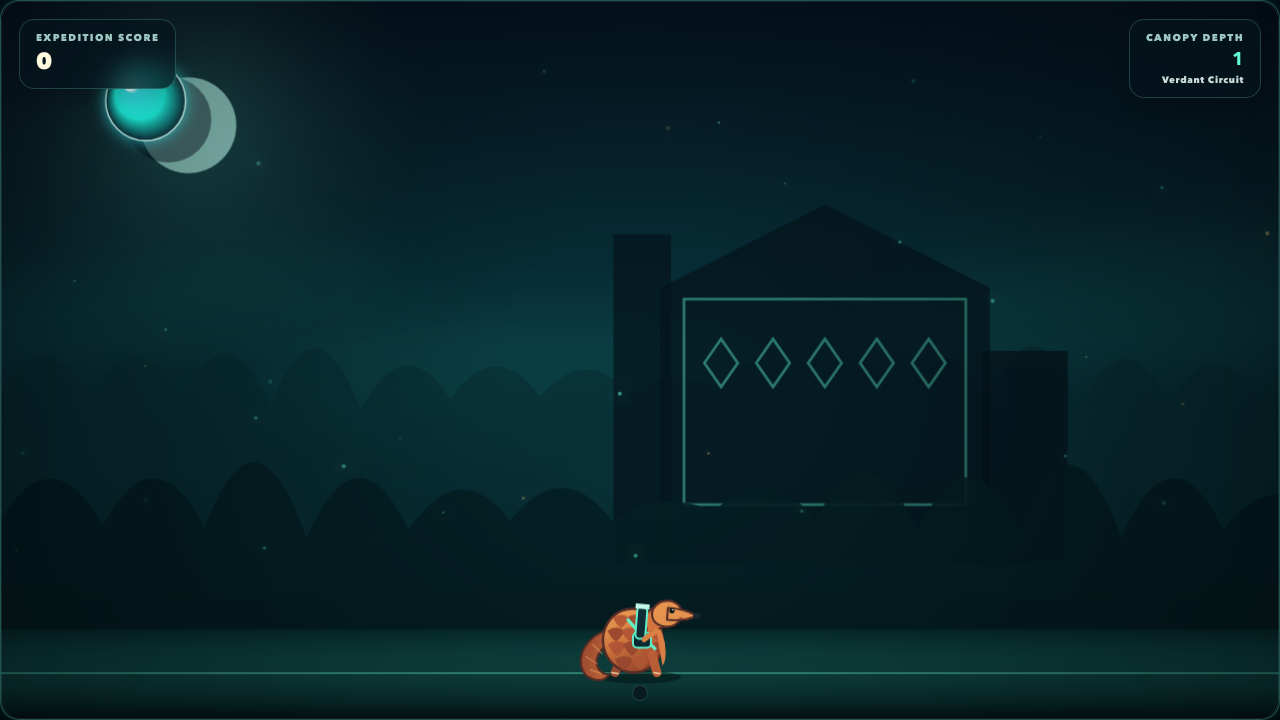
A modern browser reinterpretation of Pang, rebuilt around responsive controls, hand-authored biomes, bubble physics, and a tiny pangolin hero.
NowPlayable, polished, expanding
Next: Use play feedback to decide whether the next investment belongs in level variety, feel, or long-term progression.
Private independent product
Attik
A bilingual home-inventory PWA designed to keep English and Bulgarian item names searchable together while protecting records and photos.
NowCore system proven
Next: Exercise the complete capture-and-find loop with a real household inventory before expanding the feature set.
Independent game
Rafterkin
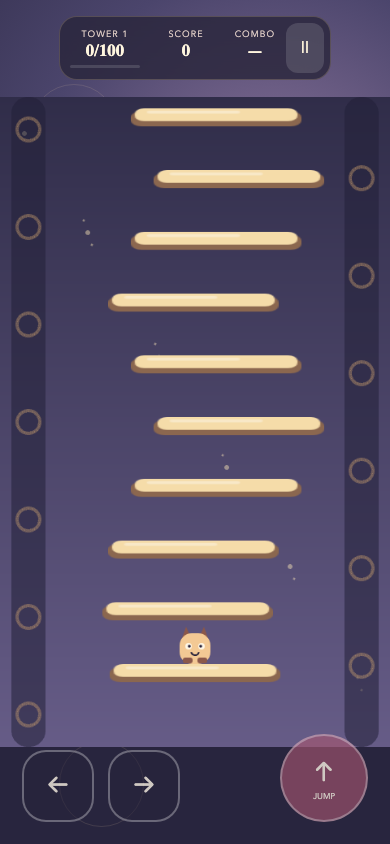
A local-first arcade game about helping sixteen cozy climbers cross sixteen towers by turning running momentum into higher jumps.
NowFull campaign, tuning feel
Next: Validate the expanded campaign, progression, and movement tuning through complete hands-on journeys before release.
Independent game
Tumbleworks
A portrait-first falling-piece crafting puzzle where completed jobs become miniature scenes and every shipped mode works without an account.
NowCommunity preview complete
Next: Use complete campaign playthroughs to tune pacing, difficulty, and the boundary between shipped preview features and future release plans.
Independent game
Nodal Bloom
A free, accountless 3D strategy game about routing energy through a living spatial ecosystem and keeping it coherent under pressure.
NowFirst full release, observing play
Next: Play through the full campaign across desktop and touch layouts, then refine the moments where spatial state or network pressure is hardest to read.
Independent game
Masswake
An original meditative physics odyssey where every movement ejects part of your mass and restraint matters as much as direction.
NowFull campaign, balancing and hardening
Next: Balance the full difficulty and store progression, validate Android thermals on physical hardware, and continue full-campaign playtesting without changing replay or save behavior.
Independent macOS utility
ThinShell
A focused macOS terminal that collapses to one row and expands again without replacing its shell, jobs, buffer, directory, or partial input.
NowDevelopment beta complete
Next: Use the beta daily and harden the terminal edge cases that only real shell work reveals.
Private independent system
Lattice
A private multi-project content system that turns source material into reusable clips, insights, campaigns, drafts, visuals, and feedback loops.
NowCore workflow connected
Next: Run the full loop on real project campaigns and remove the workflow steps that do not earn their complexity.
Private operations tool
Hypeford
A private campaign workspace for drafting, reviewing, and coordinating social content, newsletters, and community follow-ups with explicit approval before delivery.
NowConnected workflow, guarded writes
Next: Resolve the remaining private-scope acceptance decision before customer admission; validate newsletter delivery and Community Desk adapters when demand requires them.
05 / Full project ledger
Every project,
in its own season.
Wander through the full collection, filter by stage, or open a card for milestones, lessons, and what might come next.
Feb 2026 → Nov 2026Shipped / public

Independent product
Continuum
A local-first calculation workspace that turns readable notes into live results, with focused macOS, Windows, and Linux companions for quick calculations.
WebmacOSLocal-first
Public previewShipped, learning, refining
- Started
- Feb 2026 as of Aug 2026
- Available on
- Web + 3 desktop platforms as of Aug 2026
Explore project notes↘
Published desktop version 1.3.1 adds named calculation groups, controls to collapse or expand them, and a manager to rename, reorder, or ungroup regions. Pin and copy actions now use icons in the result rail. Quick Calculation, the full editor, and Canvas still share documents with conflict recovery and live variable cards. The signed and notarized macOS build passed desktop and MCP smoke tests. Windows and Linux packages passed structure checks, with installation and runtime tests outstanding. The free local file reviewer remains available, and hosted API access stays closed.
- The editor begins
The first calculation workspace established the line-based note and live-result model.
- Production surface clarified
Shipped features, starter calculators, and development-only experiments gained explicit boundaries.
- Pocket Scribe ships
The macOS companion, quick-draft stack, and handoff into the full workspace became one product loop.
- Public preview refined
Packaging, documentation, scrolling, and editor behavior received a release-focused polish pass.
- Development canvas contained
Canvas, Blueprint, and local MCP workflows gained a dedicated development boundary while the production feature catalogue stayed explicit.
- Visual workflows become composable
Editable paths, native canvas pieces, layout proposals, and document-composition tools expanded the gated visual workspace and its real campaign-capture workflow.
- Desktop delivery reaches three platforms
Verified macOS, Windows, and Linux packages expanded the companion beyond its original Apple Silicon alpha.
- Founding demand test becomes explicit
Regional reservation pricing, test-only license commerce, and canonical public documentation established a measured path toward a paid desktop release.
- Version 1.1.0 opens the desktop access path
Free and Pro plans, a 14-day trial, payment recovery, and updated download guidance made the paid desktop path explicit while preserving access to existing work.
- Free companion gets a native finishing pass
Quick Calculation became part of the Free desktop path, with preserved scratchpad handoff, a macOS lifecycle fix, and a restored branded tray icon.
- Version 1.1.4 refines visual workflows
Fullscreen Canvas settings and staged Blueprint creation made visual workspace changes easier to review before applying them.
- Guides and tour explain the product through real problems
Problem-led guides, a responsive guide library, captioned demos, and an interactive budget illustration connect everyday questions to editable calculations and explicit desktop access choices.
- Product comparisons become practical
A sourced Soulver comparison pairs documented platform and feature differences with an editable hourly-rate example; clearer macOS guidance and refined guide layouts make the learning path easier to read.
- Developer tools arrive with a closed hosted-access gate
Public developer documentation, downloadable agent tools, financial-model examples, and a free local file reviewer establish a separate API path without opening hosted trials or paid access.
- Version 1.2.0 makes formulas easier to discover
Published desktop downloads add contextual formula suggestions, guided inputs, and evaluator previews, supported by native editor screenshots and updated guides.
- The Companion leads the product story
A new captioned landing-page commercial connects the desktop Companion to the full calculation workspace.
- Version 1.3.0 connects calculations across surfaces
Published downloads add shared document editing across Quick Calculation, the editor, and Canvas, with live variable cards, conflict recovery, source inspection, and currency-aware results. Native macOS acceptance is recorded; Windows and Linux runtime checks remain outstanding.
- Editor groups gain direct controls
Merged editor work adds named regions, bulk folding controls, and a group manager that preserves calculations when groups are moved or removed. These controls later shipped in desktop version 1.3.1.
- Version 1.3.1 ships editor group controls
The desktop release adds region management and simplifies result actions to pin and copy icons. The product site also adds desktop download entry points to its navigation and footer.
Lesson
A product becomes easier to trust when its calculations, feature catalogue, documentation, and public claims all draw from the same product record.
Next
Learn how connected documents and Canvas calculators hold up in everyday work, complete Windows and Linux runtime acceptance, and keep hosted API access closed until its release gates pass.
Folded into this storyPublic release artifact repository
Sept 2025 → Nov 2026Shipped / public
Independent product
GitGlow
A local-first desktop application for exploring contribution patterns, repository activity, and the rhythm behind a body of Git work.
DesktopTauri + RustGit analytics
Live productReleased, operating, learning
- Started
- 2025 as of Sept 2026
- Desktop platforms
- macOS + Windows + Linux as of Sept 2026
Explore project notes↘
GitGlow runs on macOS, Windows, and Linux. Published version 2.0.8 adds approximate active minutes based on foreground interaction, feature navigation, and selected completed workflows to product analytics. Analytics is on by default, existing opt-outs are preserved, and anyone can turn it off in Settings for free. It excludes repository contents, paths, prompts, account identity, and arbitrary text. Session recording and automatic interaction capture are disabled. The macOS build is signed and notarized, and the Windows installer is unsigned. The release verification covered packages for Windows and Linux.
- Local Git patterns become visible
The desktop foundation turned repository history into an explorable product surface.
- Product operations added
A separate service began handling billing and entitlement boundaries around the desktop app.
- Version 1.4.2
Repository scope, hook stability, development entitlements, and release handling were tightened.
- Desktop support reaches Linux
AppImage and Debian packages joined hardened macOS and Windows delivery with checksums and platform-specific download paths.
- Agent Cockpit joins the product
Governed missions, approval records, worktree-aware change maps, metadata-only replays, and handoff exports connected GitGlow to existing MCP clients.
- Local workflows become observable
Agent-assisted journal reports, a guarded release path, and an encrypted local flight recorder made repository work easier to review without turning private source into durable telemetry.
- Version 2.0 ships the repository workbench
The daily workbench added structured diffs, staging, commit drafts, branches, conflict recovery, history tools, and clearer Free/Pro boundaries while preserving the existing product surfaces.
- Version 2.0.3 makes review work more concrete
Persistent terminal tabs and diff-bound review confidence brought everyday command and verification work into the repository workbench without obscuring stale results.
- Version 2.0.4 unifies the workspace
A redesigned repository workspace, shared commit inspection, clearer navigation, and four coordinated themes made daily Git work more cohesive.
- Version 2.0.5 keeps review state current
The published release refreshes selected diffs after Git changes, separates agent runs by attention and recency, and reduces repeated public download requests; exact public macOS acceptance is recorded separately from Windows and Linux package checks.
- Learning connects Git basics to real review work
Beginner lessons and practical sandbox exercises cover commits, branches, remotes, recovery, conflicts, staging, and worktrees, alongside guides for reviewing Claude Code, Codex, and ChatGPT changes.
- A sourced comparison supports everyday Git decisions
The GitHub Desktop comparison links documented capabilities to a practical review exercise, while an official Product Hunt badge connects the homepage to the product listing.
- Real review work becomes a product film
The homepage adds an on-demand film showing precise staging, checks, terminal work, and authentic agent monitoring, with a privacy-enhanced player that loads after Play.
- Version 2.0.7 adds controllable product measurement
The published release explains bounded product analytics at first launch and keeps a free privacy off switch on every plan. Existing opt-outs remain off; disabling analytics stops new requests and resets the installation ID.
- Version 2.0.8 expands optional product analytics
The release adds approximate active time and selected completed-workflow events, with an updated privacy notice and the existing free opt-out.
Lesson
Analytics become more useful when they help someone understand a working rhythm instead of simply producing a larger score.
Next
Observe how readers move from the learning guides, comparison, and product film into real repository review, while keeping the local workbench fast and legible.
Folded into this storyEntitlement APIPublic release artifacts
Aug 2025 → Nov 2026Shipped / public

Independent product
SubKeep
A Chrome extension that gives Google Keep stronger folder organization, focused note workflows, and local-first preferences.
Chrome extensionSvelteLocal-first
Live productShipped, listening, improving
- Started
- Aug 2025 as of Aug 2026
- Release state
- Published extension as of Aug 2026
Explore project notes↘
The extension is being refined through the 0.0.8 release line, with label picking, sidebar groups, guided setup, move previews with Undo, and localized navigation fixes. Merged 0.0.8.2 work clarifies Free and Pro plans and opens trial signup on a dedicated extension page. Starting a trial requires an explicit choice and successful verification; ordinary sign-in does not start one. A follow-up fixes hidden account controls and centers the trial page. Store publication of the candidate and any retention or conversion improvement remain unconfirmed. The captioned product film demonstrates organization and Zen Mode; usage sharing remains optional.
- Specific frustration, focused extension
The first version set out to make large Google Keep collections easier to organize.
- Public product loop
The extension, landing experience, documentation, and deterministic release checks came together.
- Zen Mode
A focused per-note reading and writing surface shipped with static-content preservation.
- Founding Preview stays reversible
A minimized-permission store package and test-mode software-license flow prepared the next release without taking existing features away from unlicensed users.
- Founding Preview moves to Stripe
A sandbox-validated subscription, billing, and signed activation flow replaced the earlier processor while production checkout and enforcement stayed closed.
- Commercial release line is rehearsed
The isolated 0.0.7.0 release line exercised account, payment, recovery, and refund paths without changing what the published extension unlocks for existing users.
- Transition draft remains unpublished
The 0.0.7.2 Store draft records a server-signed five-day update transition and in-Keep reminders, with the existing published extension left unchanged pending the final launch gate.
- Maintenance update submitted for review
With 0.0.7.2 recorded as published, the tested 0.0.7.3 package was submitted for Store review to reduce background account requests without restarting the transition or changing access rules.
- Native label navigation becomes more reliable
Confirmed label navigation and structural detection across localized Keep interfaces address failed label opening without changing SubKeep's interface language.
- First organization gains a guided path
An existing-label picker, groups, setup guidance, guarded moves with Undo, and explicit opt-in measurement make the first useful organization easier to complete; merged implementation does not establish a retention lift.
- The next candidate improves sidebar readability
Version 0.0.8.1 preparation adds clearer group guidance, stable text wrapping, readable dark dialogs, persistent group icons, and quiet successful label navigation, with Store publication still unconfirmed.
- A short film explains the organization loop
An on-demand landing-page film shows label organization and Zen Mode with English captions, a keyboard-accessible transcript, and a visible Pro feature boundary.
- Plans and trial signup become clearer
Merged 0.0.8.2 work labels Free and Pro capabilities, streamlines explicitly requested trials, and fixes signed-out account controls. Store publication and conversion gains remain unconfirmed.
Lesson
Browser-extension quality depends as much on defensive DOM behavior and clear permission boundaries as it does on the visible feature.
Next
Validate the exact 0.0.8.2 package and confirm Store publication, then evaluate the trial journey and returning use from opted-in observations.
Aug 2026 → Nov 2026Active builds


Private operations tool
Hypeford
A private campaign workspace for drafting, reviewing, and coordinating social content, newsletters, and community follow-ups with explicit approval before delivery.
Operations consoleMCPMarketing Brain
Private operations systemConnected workflow, guarded writes
- Preview coverage
- X + Bluesky + Threads as of Sept 2026
Explore project notes↘
Hypeford combines a campaign desk, saved profile previews, multi-project planning, and device-local calendar times. Postiz read-back and local campaign associations have been repaired without changing provider posts. Publishing is user-owned, with copy and export first and a private Buffer CSV/media handoff. The landing page now explains agent outcomes and a shorter signup path. Private launch work adds guarded checkout and recovery, usage limits, and email controls, while charging, customer admission, and operational email remain disabled. Newsletter execution remains simulation-only, and Community Desk retains manual engagement and approvals with live adapters pending. Private acceptance work does not establish production capacity or a public product launch.
- Safety before writes
The bridge, campaign console, demo mode, approval summary, and production operations guide shipped as one bounded foundation.
- Postiz becomes visible
Read-only synchronization, local preview profiles, editable drafts, and explicit Apply behavior connected the console to the self-hosted source of truth.
- Profiles and publishing stay guarded
Grounded profile suggestions, standalone drafts, Threads previews, restart tooling, and confirmation-protected live writes extended the workflow without hiding its boundaries.
- Campaign delivery becomes traceable
Timeline controls, local status updates, batch approvals, immutable delivery confirmation, exact scheduling, and connected-draft recovery closed the loop from plan to provider state.
- Provider recovery becomes operational
Overdue delivery visibility, Bluesky draft recovery, connected X campaigns, and safer deployment restarts strengthened the path from approved draft to confirmed provider state.
- Campaign review reaches the provider boundary
A full review workbench, provenance-aware activity, real thread previews, and exact schedule review clarified every step before the final Postiz confirmation.
- Partial delivery recovery stays visible
Campaign status and recovery now remain clear when a delivery needs a retry, preserving the distinction between a planned action and confirmed provider state.
- Research stays separate from outreach
A project-scoped opportunity queue and Reddit research lane added qualified, read-only discovery with manual capture and approval-gated API access; neither lane publishes or contacts people automatically.
- Research gains a budget and a focused review loop
Cached candidate reassessment, bounded X searches, saved scan plans, and local reply campaigns connect discovery to manual completion while keeping thread review and provider writes explicit.
- Product campaigns stay with their assigned accounts
Project-specific X routing and account checks keep product campaigns attached to their intended channels, blocking missing or mismatched destinations while preserving explicit delivery approval.
- The campaign desk gains durable workflow modules
A rebuilt workspace supports disconnected drafting, account settings, Social Scanner, Agent Flows, and persistent newsletter editing and journeys. Newsletter execution remains a local simulation rather than delivered mail.
- Community work becomes a reviewable local workflow
Community Desk persists manual conversations, reply drafts, exact approvals, simulations, and follow-ups with live adapters still pending. Multi-project Today selection and device-local calendar times improve daily planning.
- Postiz Chat Bridge becomes Hypeford
The existing product adopts the Hypeford name while preserving its data and browser sessions; saved profile previews also become visible on campaign timelines.
- Publishing handoffs and private launch work consolidate
Copy and export become the primary publishing path, with a private Buffer handoff and refined campaign-date editing. Billing, limits, and recovery work consolidate privately while charging and customer admission remain disabled.
- Campaign read-back regains reliability
Private synchronization fixes restore delivery read-back and local campaign associations without modifying provider posts or expanding publishing access.
Lesson
Automation feels safer when the unavailable actions are visible, approval context is explicit, and a demo never pretends to contact a live service.
Next
Resolve the remaining private-scope acceptance decision before customer admission; validate newsletter delivery and Community Desk adapters when demand requires them.
Jul 2026 → Oct 2026Active builds

Private independent product
Attik
A bilingual home-inventory PWA designed to keep English and Bulgarian item names searchable together while protecting records and photos.
PWABilingual searchSecurity
Private foundationCore system proven
- Current stage
- Private foundation as of Aug 2026
Explore project notes↘
The rebuilt private interface brings bilingual inventory search into a command palette, keeps item capture and editing close to the browsing context, and makes nested places easier to explore. Repair, missing-item, sale, donation, and disposal decisions have direct actions with Undo. Translation corrections can become verified dictionary entries, and quick changes preserve later edits when a conflict occurs. The product remains a private household inventory build.
- Product boundary defined
The first version locked the bilingual, private household inventory wedge.
- Secure foundation
Authentication, authorization, inventory, photos, documentation, and local setup landed together.
- Browsing reflects the real inventory
Location imagery, availability filters, and migration-tolerant views made the private capture-and-find loop more resilient.
- Private deployment becomes recoverable
Tailnet-only hosting, account recovery, and tested backup and restore operations moved the household inventory onto a controlled local production stack.
- Inventory browsing becomes steadier
Live filters now preserve selected controls, with clearer loading and action feedback during everyday inventory work.
- Location browsing gets a focused workspace
A searchable location tree and selected-space detail view made it easier to inspect, organize, and return to the household hierarchy across desktop and mobile.
- The second interface connects everyday inventory decisions
A rebuilt desktop and mobile interface adds a bilingual command palette, contextual item drawers, nested-place browsing, decision actions with Undo, and verified translation corrections while preserving private access.
Lesson
Private household software earns trust through boring details: authorization boundaries, recovery paths, careful photo handling, and language-aware search.
Next
Exercise the complete capture-and-find loop with a real household inventory before expanding the feature set.
Aug 2026 → Aug 2026Active builds

Independent game
Rafterkin
A local-first arcade game about helping sixteen cozy climbers cross sixteen towers by turning running momentum into higher jumps.
PhaserArcade physicsOffline PWA
Playable private buildFull campaign, tuning feel
- Campaign scope
- 16 towers as of Aug 2026
- Playable climbers
- 16 characters as of Aug 2026
Explore project notes↘
The private build now spans sixteen 100-floor chapters with replayable journeys, campaign trail maps, and sixteen distinct species-aware 2.5D character rigs whose richer anatomy, clothing, and palettes preserve existing saves, replays, and gameplay behavior.
- Pip enters the tower
The original game loop, deterministic tower, progression, controls, and accessibility foundation shipped together.
- Authored climb
Tower patterns, touch haptics, and momentum behavior moved the slice from system demo toward an intentional game.
- Sixteen-tower journey
Campaign replay, climber customization, prestige, cosmetics, and immersive tower artwork turned the initial climb into a complete long-form progression loop.
- The journey gains a visible identity
Trail maps, customizable tower appearances, and layered character rigs made campaign progress and the sixteen climbers more expressive without changing the deterministic climb.
- Sixteen climbers become distinct
Species-specific silhouettes, materials, clothing, portraits, and natural palettes replaced the earlier shared mascot treatment without breaking progression compatibility.
Lesson
Movement feel improves when physical velocity, earned jump momentum, and midair control are modeled as related but distinct systems.
Next
Validate the expanded campaign, progression, and movement tuning through complete hands-on journeys before release.
Aug 2026 → Aug 2026Active builds

Independent game
Masswake
An original meditative physics odyssey where every movement ejects part of your mass and restraint matters as much as direction.
PhaserPhysics gameAndroid + PWA
Playable private buildFull campaign, balancing and hardening
- Campaign arenas
- 60 as of Aug 2026
- Realms
- 8 as of Aug 2026
Explore project notes↘
The playable build spans a 60-arena campaign across eight realms with deterministic rivals and replays, now reinforced by realm-specific spatial soundscapes, scalable vistas, clearer controls, and polished scenery across compact and ultrawide layouts.
- First playable realm
The mass-conserving movement system became an original playable campaign foundation.
- Eight realms unfold
The campaign expanded across distinct worlds, forms, abilities, responsive layouts, and an original visual and audio identity.
- Difficulty and earned progression
Three challenge modes, story-gated utilities, Lumens, deterministic rivals, replay-safe loadouts, and bounded Android rendering completed the main progression loop.
- The realms gain depth
Procedural spatial soundscapes, scalable vistas, and cleaner scenery seams made each realm more immersive without changing the deterministic campaign core.
Lesson
A simple physical rule can sustain a long campaign when realms, rivals, abilities, progression, and presentation expand the decisions without changing the deterministic core.
Next
Balance the full difficulty and store progression, validate Android thermals on physical hardware, and continue full-campaign playtesting without changing replay or save behavior.
Aug 2026 → Aug 2026Active builds
Independent game
Tumbleworks
A portrait-first falling-piece crafting puzzle where completed jobs become miniature scenes and every shipped mode works without an account.
Puzzle gameOffline PWADeterministic play
Community previewCommunity preview complete
- Authored jobs
- 18 as of Aug 2026
- Campaign steps
- 6 as of Aug 2026
Explore project notes↘
The Community Preview includes an 18-job campaign, daily and endless modes, deterministic challenge codes, local saves, offline PWA support, accessibility controls, tactile material themes, and a smoother dragged-piece descent with a short recovery window.
- Community Preview opens
The accountless campaign, authored jobs, challenge modes, local progression, and offline release boundary landed together.
- Campaign becomes a place
Completion flow, evolving scenes, material skins, mobile reliability, and tactile feedback gave each job a clearer sense of arrival.
- Dragged drops become recoverable
A slower render-only descent added a brief cancellation window for accidental drops while preserving deterministic board state and replay behavior.
Lesson
A familiar puzzle grammar becomes its own product when progression, material feedback, scene-building, and mobile ergonomics all reinforce the same theme.
Next
Use complete campaign playthroughs to tune pacing, difficulty, and the boundary between shipped preview features and future release plans.
Aug 2026 → Aug 2026Active builds

Independent game
Nodal Bloom
A free, accountless 3D strategy game about routing energy through a living spatial ecosystem and keeping it coherent under pressure.
Three.jsStrategy gameSeeded expeditions
Release 0.1.0First full release, observing play
- Campaign regions
- 6 as of Aug 2026
- Authored events
- 24 as of Aug 2026
Explore project notes↘
Release 0.1.0 contains six campaign regions, deterministic seeded expeditions, three difficulty profiles, local saves, procedural audio, and complete offline play after the first download.
- The reef becomes playable
Six regions, ten node archetypes, authored events, mutations, expeditions, persistence, accessibility, and offline support shipped as release 0.1.0.
Lesson
A dense strategy system becomes learnable when the network view, close-up dioramas, guided controls, and deterministic simulation all explain the same ecosystem.
Next
Play through the full campaign across desktop and touch layouts, then refine the moments where spatial state or network pressure is hardest to read.
Dec 2024 → Aug 2026Shipped / public

Product contribution / collaboration
Green Compass
A mobile-first climate-action product that turns broad sustainability goals into approachable guidance and concrete next steps.
MobileWebProduct design
Live collaborationLive collaboration, evolving
- Collaboration since
- Dec 2024 as of Aug 2026
- Public surfaces
- Mobile + web as of Aug 2026
Explore project notes↘
My contribution spans a cohesive mobile and web product surface, including an editorial marketing system, responsive presentation, and product roadmap storytelling.
- Web foundation
The product gained a public surface for its mission, roadmap, and practical guidance.
- Shared product system
Mobile and web work converged around a clearer product and content model.
- Editorial redesign
The marketing experience was rebuilt around a cohesive eco-tech visual language and more legible storytelling.
Lesson
Mission-driven products become more credible when the interface translates large ambitions into specific actions without overstating impact.
Next
Keep the public product story aligned with the roadmap and the practical actions available today.
Aug 2026 → Aug 2026Active builds
Independent macOS utility
ThinShell
A focused macOS terminal that collapses to one row and expands again without replacing its shell, jobs, buffer, directory, or partial input.
macOSSwiftPTY lifecycle
Unsigned development betaDevelopment beta complete
- Current version
- 0.1.0 beta as of Aug 2026
- Target
- macOS 14+ as of Aug 2026
Explore project notes↘
Version 0.1.0 establishes a persistent PTY, compact and expanded modes, zsh-aware expansion, three skins, terminal preferences, local packaging, and no telemetry.
- From one row to a real terminal
The entire 0.1.0 foundation, verification path, documentation, and local release process landed in the first focused build.
Lesson
A deliberately small utility still needs deep respect for process continuity, input state, accessibility, packaging, and native platform behavior.
Next
Use the beta daily and harden the terminal edge cases that only real shell work reveals.
Mar 2025 → Aug 2026Active builds
Independent game
Ricoscale
A modern browser reinterpretation of Pang, rebuilt around responsive controls, hand-authored biomes, bubble physics, and a tiny pangolin hero.
Browser gameVueCanvas
Public buildPlayable, polished, expanding
- Started
- Mar 2025 as of Aug 2026
- Build availability
- Public web build as of Aug 2026
Explore project notes↘
Arcade and campaign play, power-ups, responsive canvas behavior, deterministic biomes, and a complete visual redesign are available in a public browser build.
- First bubbles
The core movement, projectile, split, and collision loop established the playable foundation.
- Modes and progression
Arcade, campaign structure, power-ups, and persistent high scores expanded the loop.
- Neon Canopy
A cohesive procedural-biome redesign landed across desktop and mobile layouts.
Lesson
Game polish comes from systems agreeing: movement, collisions, camera, effects, responsive layout, and art direction all have to reinforce the same rhythm.
Next
Use play feedback to decide whether the next investment belongs in level variety, feel, or long-term progression.
Mar 2026 → Apr 2026Active builds

Private independent system
Lattice
A private multi-project content system that turns source material into reusable clips, insights, campaigns, drafts, visuals, and feedback loops.
Next.jsPostgreSQLAI workflows
Working private systemCore workflow connected
- Current stage
- Private working system as of Apr 2026
Explore project notes↘
Input, Thinking, Gallery, Expression, and Feedback systems share a project-scoped data model, workflow pipeline, and local storage boundary.
- Project context gets a home
The Input System established durable sources, context, knowledge, and notes.
- The loop closes
Thinking, expression, gallery, and feedback became one project-scoped operating system.
Lesson
AI-assisted content becomes more useful when context, generation, visual guidance, and feedback remain connected to the project that produced them.
Next
Run the full loop on real project campaigns and remove the workflow steps that do not earn their complexity.
Aug 2025 → Sept 2025Lab / archive
Browser experiment
BetterFinder
A Chrome extension prototype for finding and highlighting text across complex pages, frames, and shadow roots.
Chrome extensionSvelteDOM traversal
Completed prototypeTechnical prototype complete
- Prototype window
- 2 weeks as of Sept 2025
Explore project notes↘
The prototype explored content-script boundaries, keyboard workflows, inaccessible-frame feedback, and non-destructive highlighting.
- Search beyond the obvious DOM
The first implementation explored frames, shadow roots, and safe text highlighting.
- Keyboard loop refined
Hotkeys and interaction improvements completed the focused technical prototype.
Lesson
The hard part of better page search is not the input field; it is accurately explaining what the browser could not inspect.
Next
Keep the implementation as reusable research unless a narrow audience demonstrates a repeatable need.
Jul 2025 → Jul 2025Lab / archive
Product experiment
Tendli
A cross-platform Flutter experiment exploring the first loop of a small virtual companion.
FlutterCross-platformCompanion loop
Paused experimentPrototype complete, paused
- Experiment window
- Jul 2025 as of Jul 2025
Explore project notes↘
The initial cross-platform shell and UI loop are preserved as a bounded product experiment rather than an active roadmap.
- Cross-platform shell
The first Flutter foundation established mobile, desktop, and web targets.
- UI loop explored
A short focused pass tested the companion interaction before the project was paused.
Lesson
Cross-platform reach is not a substitute for a sharply defined daily reason to return.
Next
Revisit only if a specific companion loop proves stronger than the general product idea.
A little context for the numbers.
Dates, releases, versions, platforms, and product states come from project history. Usage, traffic, downloads, or revenue join the journal when there is a clear source, an “as of” date, and something useful to learn from the snapshot.
06 / Follow the build
The next entry
is still being made.
I share product decisions, release notes, and the useful parts of unfinished work. Follow along for what changed, what I learned, and where each project wanders next.